TL;DR: Starting with a personal developer account feels fast when prototyping, but modern app and game stores hit individual accounts with severe roadblocks. Google Play forces new personal accounts into a mandatory 20-tester, 14-day closed testing gauntlet and publicly displays your home address if you monetize. Apple locks your personal legal name on the storefront forever and restricts team roles. For any commercial release or team collaboration, setting up a formal business entity (such as an LLC) with a D-U-N-S number saves weeks of headaches.
┌────────────────────────────────────────────────────────────────────────┐
│               DEVELOPER ACCOUNT ARCHITECTURE DECISION TREE             │
├────────────────────────────────────────────────────────────────────────┤
│                                                                        │
│                       Starting a New Project                           │
│                                  │                                     │
│                                  ▼                                     │
│               Commercial Product or Free Hobby?                        │
│                     │                         │                        │
│          ┌──────────┴──────────┐   ┌──────────┴──────────┐             │
│          ▼                     │   │                     ▼             │
│   Free Hobby / Student         │   │   Commercial / Team / Monetized   │
│          │                     │   │                     │             │
│          ▼                     │   │                     ▼             │
│   PERSONAL ACCOUNT             │   │   BUSINESS ENTITY ACCOUNT         │
│   ├─ Google: 20-Tester 14-Day  │   │   ├─ Google: Direct Production    │
│   ├─ EU DSA: Home Address Doxx │   │   ├─ EU DSA: Corporate Address    │
│   ├─ Apple: Personal Name Only │   │   ├─ Apple: Studio Name Displayed │
│   └─ No Team Member Roles      │   │   └─ Granular Team Roles & Keys   │
│                                                                        │
└────────────────────────────────────────────────────────────────────────┘
The Solo Dilemma: Fast Setup vs. Long-Term Shield
When you are wrapping up a game or mobile app over a weekend, the impulse to click "Individual" on a developer signup page is huge. It takes ten minutes, skips corporate paperwork, and lets you upload code today.
A few months later, reality strikes:
- You want a friend or contractor to test a build, but you cannot grant them developer permissions without handing over your personal Apple ID or Google credentials.
- You turn on in-app purchases or ads, and European regulations force the app store to publish your private home living room address on the public web.
- Google Play informs you that your game cannot go live until you recruit 20 people to run private daily tests on physical Android phones for two uninterrupted weeks.
Every major app store separates accounts into two distinct classes: Personal (Individual) and Organization (Company / Business). While both can distribute software, their regulatory treatments, privacy rules, verification moats, and operational ceilings are completely different.
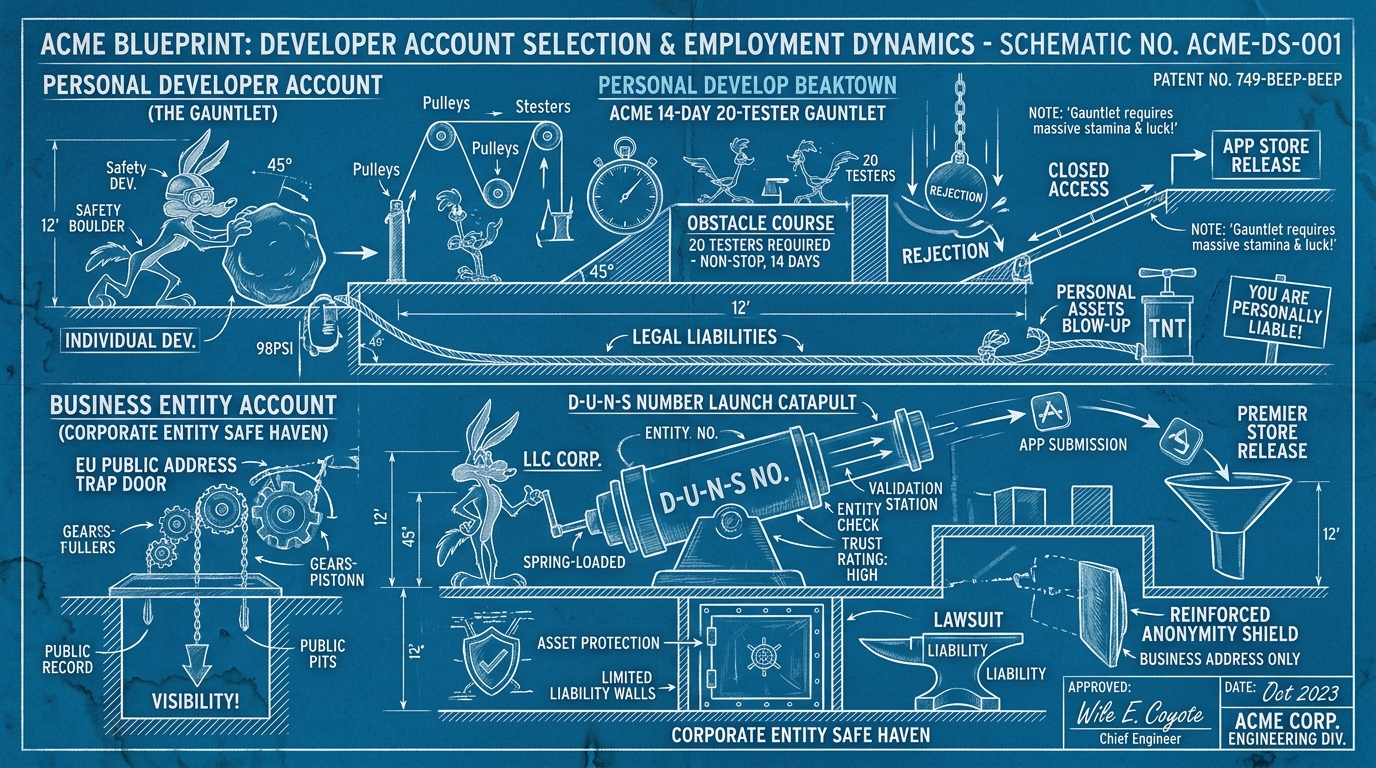
Google Play Store: The 14-Day 20-Tester Gauntlet
Google Play underwent a massive policy shift for individual developers in late 2023. If you have not created a new developer account recently, this change comes as an abrupt shock.
The 20-Tester, 14-Day Closed Testing Rule
For any personal Google Play Console account created after November 13, 2023, Google prohibits direct publishing to the production track.
Before you can submit an app to public production review, you must:
- Set up a Closed Testing Track.
- Recruit a minimum of 20 distinct testers.
- Have all 20 testers opt into the test and remain opted in for at least 14 continuous days.
┌────────────────────────────────────────────────────────────────────────┐
│               GOOGLE PLAY PERSONAL ACCOUNT TESTING GAUNTLET            │
├────────────────────────────────────────────────────────────────────────┤
│                                                                        │
│   Create Account ──► Upload AAB ──► Recruit 20 ──► 14 Continuous Days  │
│   (Post-Nov 2023)    Closed Track   Testers        Active On-Device    │
│                                                          │             │
│                                                          ▼             │
│   Production Live ◄── Passed ◄── Essay Questionnaire ◄───┘             │
│                         │        Application Review                    │
│                         ▼                                              │
│                      Rejected ──► Return to Closed Testing             │
│                                                                        │
└────────────────────────────────────────────────────────────────────────┘
The Production Access Application Gate
Reaching day 15 does not automatically open the store doors. After the 14 days elapse, a button labeled "Apply for production" unlocks in the Google Play Console.
Clicking this button presents a mandatory essay questionnaire where you must answer:
- How did you recruit your testers?
- How did you collect feedback during the test?
- What specific bugs did testers report, and what code changes did you make in response?
- Why is your app ready for general consumers on Google Play?
Google evaluates these answers manually. If your answers look robotic or your testers never opened the app, Google rejects the production application. You are sent back to closed testing for another round.
The Organization Exemption
Organization (Company) accounts do not have this requirement.
If you register your account as an Organization (requiring an official business entity and D-U-N-S number), you can publish directly to production or open testing on day one. Google reserves the 20-tester requirement exclusively for personal accounts to deter fly-by-night ad farms and malware repackagers.
The Public Address Exposure Trap (EU DSA)
Under the European Union Digital Services Act (DSA) and Google's updated identity policies, any developer offering paid apps, in-app purchases, or ads must declare their legal address.
- On an Organization account, you publish your business mailing address, registered agent address, or corporate headquarters.
- On a Personal account, Google verifies your identity using government documents and utility bills matching your home residence. If you monetize, your personal home address is published directly on the Google Play store listing for anyone in the world to see.
Apple Developer Program: Individual vs. Organization
Apple charges $99 per year regardless of whether you register as an Individual or an Organization (or $299 per year for the specialized Apple Developer Enterprise Program for internal company apps). However, the operational differences are stark.
What Apple Requires for an Organization Account
To enroll as an Organization, Apple requires:
- A Legal Business Entity: An LLC, Corporation, GmbH, Ltd., or equivalent formally registered with your state or national government. Sole proprietorships and DBAs without separate legal identity must enroll as Individuals.
- A D-U-N-S Number: An international 9-digit corporate identifier issued by Dun & Bradstreet. Obtaining one is free, but can take one to two weeks if your entity is newly filed.
- Legal Binding Authority: You must either be the founder/owner or have formal corporate authority to bind the company to legal agreements. Apple calls your registered business telephone number to verify this verbally.
- Public Website on a Custom Domain: Apple requires a company website using an email address matching your corporate domain name (e.g.
ryan@drawk.com, not a generic Gmail or Yahoo address).
Storefront Seller Name: Permanent Identity Exposure
- Individual Accounts: Your real, legal first and last name (e.g., "John Doe") appears permanently under the title as the Seller on the App Store worldwide. You cannot use a studio nickname, brand handle, or pseudonym.
- Organization Accounts: The storefront displays your registered business name (e.g., "Drawlabs Studio LLC"). Your personal name remains private.
Multi-User Team Roles & Access Control
In an Individual account, App Store Connect provides very limited collaboration:
- You cannot assign team members full developer or administrative roles with certificate signing privileges.
- To automate CI/CD or give a senior engineer access to certificates and provisioning profiles, solo developers often resort to sharing their primary Apple ID credentials. This creates massive security risks and violates Apple's Terms of Service.
In an Organization account:
- You can invite dozens of team members across granular roles: Admin, App Manager, Developer, Finance, Marketing, and Customer Support.
- Engineers generate their own scoped API keys and certificates without touching root account credentials.
- Team members can be restricted to specific apps in your catalog.
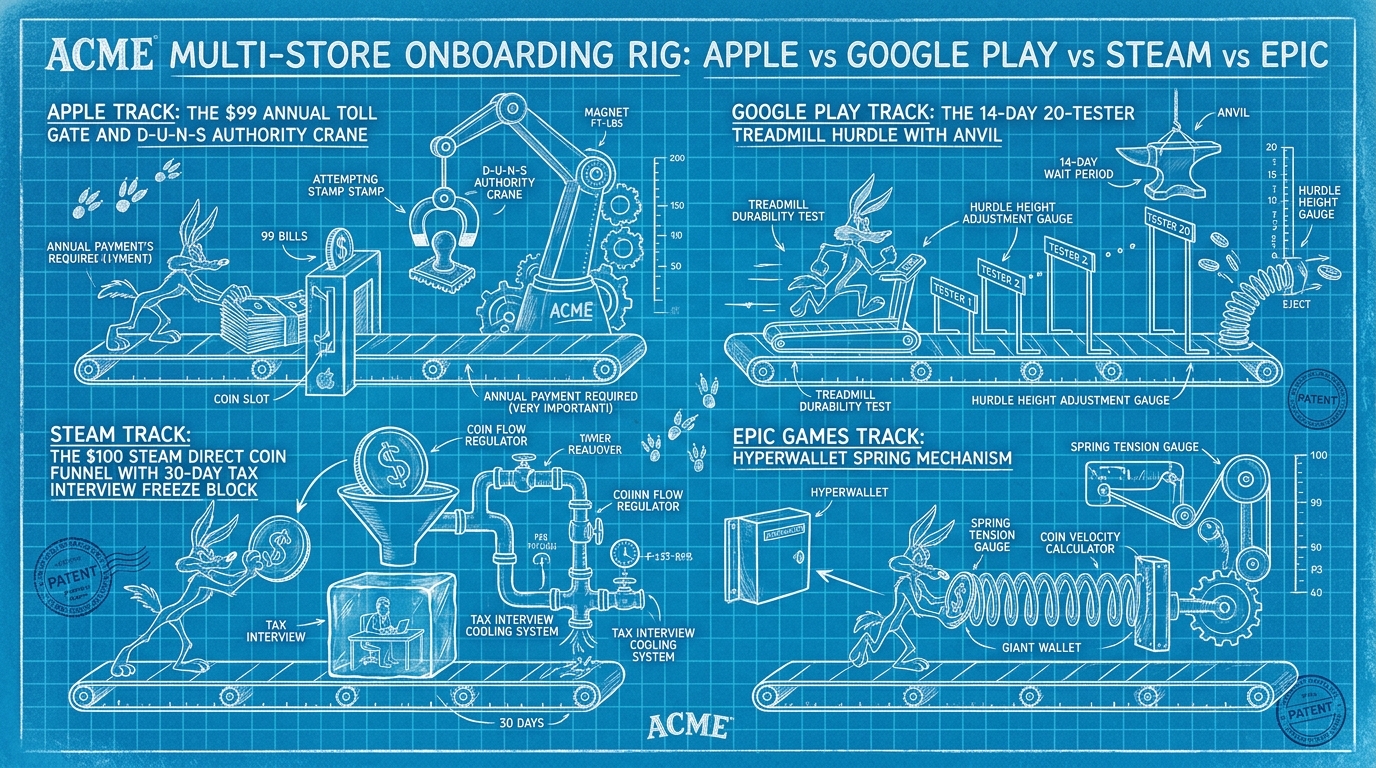
Steam (Valve Steamworks): The Direct Recoup and Banking Match
Valve's Steamworks portal operates differently from mobile ecosystems. There is no annual subscription fee. Instead, Valve charges a flat $100 Steam Direct Fee for every game you submit.
Recouping the Submission Fee
The $100 Steam Direct fee is fully recoupable. Once your game achieves $1,000 in gross revenue on Steam, Valve credits the $100 fee back to your account in your next regular monthly payout.
The Strict Bank Account Matching Rule
The single most common mistake indie developers make on Steam is setting up a Steamworks account under their personal name, and then providing business checking account details for payouts (or vice versa).
Valve uses an automated banking compliance system:
- If your Steamworks account is registered to Jane Doe (Sole Proprietor), the bank account name must say Jane Doe.
- If your Steamworks account is registered to Retro Game Works LLC, the bank account must belong strictly to Retro Game Works LLC.
- Any discrepancy causes Valve's payment processor to reject transfers or place your account on a permanent financial hold until legal documentation is verified.
The 30-Day New Account Freeze & Tax Interview
Every new Steamworks partner must complete an automated digital tax interview:
- US entities fill out an electronic W-9.
- International entities fill out a W-8BEN or W-8BEN-E (withholding rates depend on international tax treaties with the United States).
- From the moment your tax status is verified and bank details are entered, Valve enforces a mandatory 30-day payout hold. You cannot receive payouts or release games during this onboarding window.
Team Management on Steam
Unlike Apple's individual tier, Steam allows both personal and corporate partners to add team members through Steamworks permissions. You can grant trusted colleagues access to edit store pages, manage pricing, upload build depots, or review financial analytics. However, transferring a game title between two distinct Steamworks accounts requires submitting formal legal transfer paperwork to Valve customer support.
Epic Games Store: Self-Publishing & Hyperwallet
Epic Games Store offers self-publishing for games on PC and Mac with an 88/12 revenue split.
- Fee: Like Steam, Epic charges a $100 submission fee per product.
- Recoup Mechanism: Epic waives its 12% revenue share on your first $1,000,000 in gross revenue under the Epic First Run or Unreal Engine royalty programs, and refunds the $100 fee after $100,000 in gross receipts.
- Onboarding & Financials: Epic conducts payouts through Hyperwallet (a PayPal service). Organization onboarding requires submitting corporate registry documents, taxpayer identification numbers (EIN / VAT), and passing financial identity checks.
- Cross-Play Requirements: If your game has multiplayer and is released on other PC stores (like Steam), Epic requires cross-play support across all PC storefronts using Epic Online Services (EOS) or custom matchmakers.
Master Comparison Matrix
┌────────────────────────────────────────────────────────────────────────┐
│                   ECOSYSTEM VERIFICATION ATTRIBUTES                    │
├────────────────────┬──────────────────┬────────────────────────────────┤
│ STORE PLATFORM     │ COST / FEE       │ KEY ACCOUNT CONSTRAINT         │
├────────────────────┼──────────────────┼────────────────────────────────┤
│ Apple App Store    │ $99 / year       │ Individual: Real name as seller│
│                    │                  │ Org: D-U-N-S + Granular roles  │
├────────────────────┼──────────────────┼────────────────────────────────┤
│ Google Play Store  │ $25 one-time     │ Individual: 20 testers/14 days │
│                    │                  │ Org: Instant production tracks │
├────────────────────┼──────────────────┼────────────────────────────────┤
│ Valve Steamworks   │ $100 / game      │ Bank account must match entity │
│                    │ (recoupable)     │ 30-day onboarding payout hold  │
├────────────────────┼──────────────────┼────────────────────────────────┤
│ Epic Games Store   │ $100 / game      │ Hyperwallet tax verification   │
│                    │ (recoupable)     │ Crossplay parity requirement   │
└────────────────────┴──────────────────┴────────────────────────────────┘
The table below breaks down the operational differences across all major application and game distribution platforms:
| Attribute | Apple App Store (Individual) | Apple App Store (Organization) | Google Play (Personal) | Google Play (Organization) | Steamworks (Individual / Company) | Epic Games Store |
|---|---|---|---|---|---|---|
| Registration Cost | $99 / year | $99 / year | $25 one-time | $25 one-time | $100 / product (recoupable) | $100 / product (recoupable) |
| Entity Verification | Personal ID | D-U-N-S + Phone Check | Personal ID | D-U-N-S + Registry Docs | W-9 / W-8BEN Tax Interview | Hyperwallet Business Docs |
| Pre-Launch Testing Gate | None (TestFlight optional) | None (TestFlight optional) | Mandatory 20 testers for 14 continuous days | None (Closed test optional) | None (Internal betas optional) | None |
| Storefront Seller Name | Legal personal name | Company legal name | Personal name / Developer name | Verified Company name | Custom Developer / Publisher string | Custom Developer / Publisher string |
| Public Address Exposure | EU DSA Trader only | Corporate address | Home address public if monetizing | Corporate office / Agent address | Hidden (Tax info private to Valve) | Hidden (Managed via Hyperwallet) |
| Team Roles & Permissions | Minimal (no cert sharing) | Full (Admin, Dev, Finance) | Basic console invitations | Full multi-user console roles | Full Steamworks user permissions | Full Developer Portal team roles |
| App / IP Ownership Transfer | Entangled with Apple ID | Clean corporate asset | Tied to personal Google account | Clean corporate transfer | Requires Valve legal ticket | Requires Epic support contract |
Practical Recommendations: What Should You Choose?
┌────────────────────────────────────────────────────────────────────────┐
│                      ACCOUNT STRATEGY PLAYBOOK                         │
├────────────────────────────────────────────────────────────────────────┤
│                                                                        │
│   Free hobby experiment or student portfolio?                          │
│   ├──► YES ──► Use a Personal Account (skip corporate setup).          │
│   │                                                                    │
│   └──► NO  ──► Planning commercial release, ads, IAP, or team members? │
│                └──► Form an LLC / Corporation first.                   │
│                     Request free D-U-N-S Number from Dun & Bradstreet. │
│                     Enroll as an Organization from day one.            │
│                                                                        │
└────────────────────────────────────────────────────────────────────────┘
Choose an Individual / Personal Account If:
- You are building free hobby prototypes, experimental game jams, or open-source tools with zero monetization (no in-app purchases, no subscriptions, and no advertising networks).
- You are comfortable having your real legal name displayed publicly on the App Store.
- You have a reliable network of friends with Android devices who are willing to keep your app installed and run daily test builds for two weeks straight on Google Play.
Choose an Organization / Business Account If:
- You want your home address kept private: If you distribute commercial software in the EU or monetize on Google Play, an organization account lets you list a commercial office address or registered agent rather than your personal home.
- You want to avoid the 20-tester roadblock: Organization accounts on Google Play bypass the 14-day closed testing gauntlet, letting you publish on your schedule.
- You have multiple team members: Delegating development, marketing, and accounting without sharing root credentials requires organization-tier role management.
- You plan to raise money, sell the studio, or transfer apps: Contracts, investor capital, and intellectual property transfers flow smoothly through corporate entities, whereas migrating apps out of personal accounts is notoriously complex.
Taking two weeks to establish an official business entity, obtain an EIN, and register a free D-U-N-S number with Dun & Bradstreet is one of the highest-leverage investments you can make before launching on modern app stores.